
Thinkphp6 接入对象存储(七牛云)
发表于:2022-01-05浏览:66次
1、PHP 安装插件 fileinfo
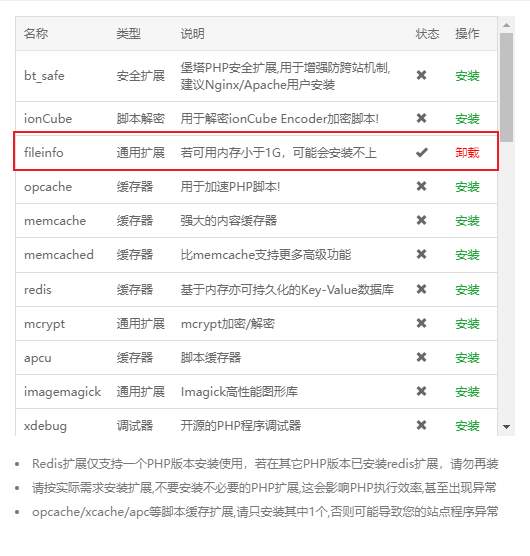
2、打开禁用函数 putenv 和proc_open
3、升级league/flysystem 版本
composer update league/flysystem
4、安装 xy_jx/thinkphp-filesystem-cloud
composer require xy_jx/thinkphp-filesystem-cloud
5、修改配置文件 config/filesystem.php
<?php

use think\facade\Env;

return [
    // 默认磁盘
    'default' => Env::get('filesystem.driver', 'local'),
    // 磁盘列表
    'disks'   => [
        'local'  => [
            'type' => 'local',
            'root' => app()->getRuntimePath() . 'storage',
        ],
        'public' => [
            // 磁盘类型
            'type'       => 'local',
            // 磁盘路径
            'root'       => app()->getRootPath() . 'public/storage',
            // 磁盘路径对应的外部URL路径
            'url'        => '/storage',
            // 可见性
            'visibility' => 'public',
        ],
        // 更多的磁盘配置信息
        'aliyun' => [
            'type'         => 'aliyun',
            'accessId'     => '**',
            'accessSecret' => '**',
            'bucket'       => 'zhituoss',
            'endpoint'     => '**',
            'url'          => '**',//不要斜杠结尾,此处为URL地址域名。
        ],
        'qiniu'  => [
            'type'      => 'qiniu',
            'accessKey' => '******',
            'secretKey' => '******',
            'bucket'    => 'bucket',
            'url'       => '',//不要斜杠结尾,此处为URL地址域名。
        ],
    ],
];
6、文件上传方法
//上传文件
public function upload()
{
    $param = get_params();
    if (request()->file('file')) {
        $file = request()->file('file');
    } else {
        return to_assign(1, '没有选择上传文件');
    }
    // dump($file);die;
    // 获取上传文件的hash散列值
    $sha1 = $file->hash('sha1');
    $md5 = $file->hash('md5');
    $rule = [
        'image' => 'jpg,png,jpeg,gif',
        'doc' => 'doc,docx,ppt,pptx,xls,xlsx,pdf',
        'file' => 'zip,gz,7z,rar,tar',
    ];
    $fileExt = $rule['image'] . ',' . $rule['doc'] . ',' . $rule['file'];
    //1M=1024*1024=1048576字节
    $fileSize = 2 * 1024 * 1024;
    if (isset($param['type']) && $param['type']) {
        $fileExt = $rule[$param['type']];
    }
    if (isset($param['size']) && $param['size']) {
        $fileSize = $param['size'];
    }
    $validate = \think\facade\Validate::rule([
        'image' => 'require|fileSize:' . $fileSize . '|fileExt:' . $fileExt,
    ]);
    $file_check['image'] = $file;
    if (!$validate->check($file_check)) {
        return to_assign(1, $validate->getError());
    }
    // 日期前綴
    $dataPath = date('Ym');
    $use = 'thumb';
    $filename = \think\facade\Filesystem::disk('qiniu')->putFile($dataPath, $file, function () use ($md5) {
        return $md5;
    });
    if ($filename) {
        //写入到附件表
        $data = [];
        $path = get_config('filesystem.disks.qiniu.url');
        $data['filepath'] = $path . '/' . $filename;
        $data['name'] = $file->getOriginalName();
        $data['mimetype'] = $file->getOriginalMime();
        $data['fileext'] = $file->extension();
        $data['filesize'] = $file->getSize();
        $data['filename'] = $filename;
        $data['sha1'] = $sha1;
        $data['md5'] = $md5;
        $data['module'] = \think\facade\App::initialize()->http->getName();
        $data['action'] = app('request')->action();
        $data['uploadip'] = app('request')->ip();
        $data['create_time'] = time();
        $data['user_id'] = get_login_admin('id') ? get_login_admin('id') : 0;
        if ($data['module'] = 'admin') {
            //通过后台上传的文件直接审核通过
            $data['status'] = 1;
            $data['admin_id'] = $data['user_id'];
            $data['audit_time'] = time();
        }
        $data['use'] = request()->has('use') ? request()->param('use') : $use; //附件用处
        $res['id'] = Db::name('file')->insertGetId($data);
        $res['filepath'] = $data['filepath'];
        $res['name'] = $data['name'];
        $res['filename'] = $data['filename'];
        add_log('upload', $data['user_id'], $data);
        return to_assign(0, '上传成功', $res);
    } else {
        return to_assign(1, '上传失败,请重试');
    }
}