## 多环境设置
有以下几种环境
application.yml
application-dev.yml 开发环境
application-pro.yml 生产环境
application-test.yml 测试环境
##### 配置application.yml环境
```yaml
spring:
profiles:
#多环境配置
active: @profileActive@
```
@profileActive@是可配置多环境设置
需要配置POM配置,不然启动会报错:
```sql
Caused by: org.yaml.snakeyaml.scanner.ScannerException: while scanning for the next token
found character '@' that cannot start any token. (Do not use @ for indentation)
in 'reader', line 19, column 13:
active: @profileActive@
```
POM新增配置如下:
```xml
dev
dev
true
test
test
pro
pro
```
配置了以上设置会maven会出现可选择打包环境选项,可选择对应的启动环境
[](https://img2022.cnblogs.com/blog/2501675/202206/2501675-20220615174607771-1229088881.png)
对@profileActive@标识符的解析插件
```xml
org.apache.maven.plugins
maven-resources-plugin
3.1.0
@
false
```
resource的配置
```xml
src/main/resources
true
**/*
```
最后刷新mvn
[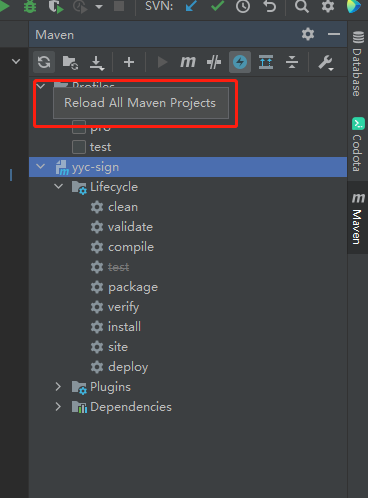](https://img2022.cnblogs.com/blog/2501675/202206/2501675-20220615174446686-804062907.png)
如果不行clean再更新一次